
 I created this script to check the ports for the OMi monitoring tool, its useful during implimentation.
Download the script from guthub
https://github.com/iopsmon/omi_port_scan
Ports checked : 383 443 8443 1098 1099 5445 8009 8080 29000
I created this script to check the ports for the OMi monitoring tool, its useful during implimentation.
Download the script from guthub
https://github.com/iopsmon/omi_port_scan
Ports checked : 383 443 8443 1098 1099 5445 8009 8080 29000
This script will get some OS level info, I used this for documentation post delivery work.
https://github.com/iopsmon/linux_os_info_script
Test only on RHEL 6/7 servers, but it can be easly adapted to a different Linux server type
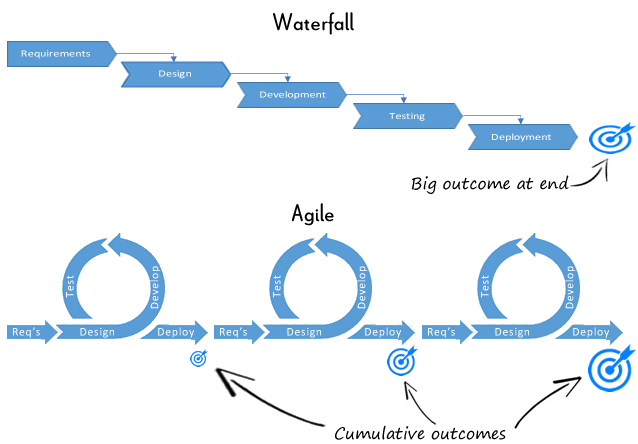
Agile and Waterfall for monitoring solutions, these methods have been around for many years and are two different approaches when it comes to delivering IT projects.
I have worked on many systems and application monitoring projects and found for software that is out of the box or shrink-wrapped, it’s better to use the waterfall methodology that the agile, this is because the functional, non-functional and features required can be defined during the design phase and then delivered upon as expected.
This methodology seemed to work much better than using the agile methodology as the requirement and sprints just seemed to get out of control due to unreasonable demands for feature rich requirement and capabilities upfront, this just seem to hamper the build and delivery process, and thus the requirements could not be met in the time, perhaps given longer time they could have been, and I believe this is to do with the fact that monitoring solutions for the enterprise require many years to become mature, you start of small and build in the key features and functions, then build up the solution and tailor it as to how you want. Agile is suited to devops and software development lifecycles, for out of the box software I would choose waterfall as this tends to be better in my opinion.
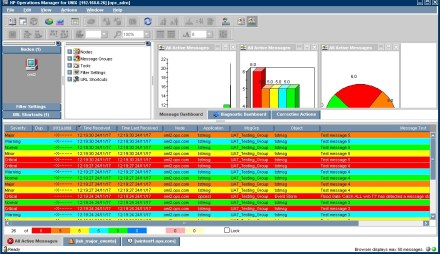
Although OM is ending its life and the new platform is OMi is taking its place, this script is still useful during OM to OMi migraiton work and can be used when you want to send test events from OML to OMi
It will generate opcmsg events (for operations manager / Linux only), if message storm is operational on the OML server, then it may well stop the events after a number of events as its thinks its a message storm. So it can act as a test for messages and storms.
you will need to create a opcmsg policy and add the application, object and message group or deploy one with no conditions for test purposes.
================================================================
#!/bin/bash
#Script to generate test opcmsg
date
cnt=1
for (( i=1; i <= 10; i++ ))
do
/opt/OV/bin/opcmsg severity=normal application=tstmsg object=tstmsg msg_grp=UAT msg_text=”Test message $cnt” &
/opt/OV/bin/opcmsg severity=warning application=tstmsg object=tstmsg msg_grp=UAT msg_text=”Test message $cnt” &
/opt/OV/bin/opcmsg severity=minor application=tstmsg object=tstmsg msg_grp=UAT msg_text=”Test message $cnt” &
/opt/OV/bin/opcmsg severity=major application=tstmsg object=tstmsg msg_grp=UAT msg_text=”Test message $cnt” &
/opt/OV/bin/opcmsg severity=critical application=tstmsg object=tstmsg msg_grp=UAT msg_text=”Test message $cnt” &
let cnt=cnt+1
sleep 3
done
date
================================================================
Good to know which APM tools are the leaders:
OM/OMi Monitoring Tips
The tips below will help you with monitoring outcomes, I have used these steps to ensure the deployment and ongoing process of monitoring is successful, I hope these will help you.
These were based on OM (Operations manager deployments)
After following these key steps, you will have a mature monitoring solution.
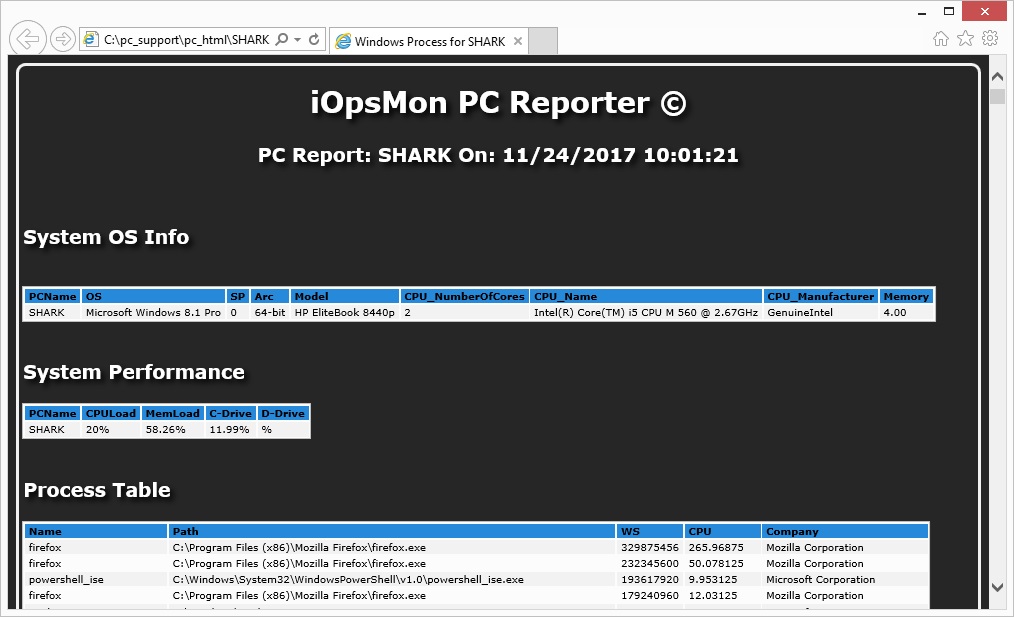
This script runs on your laptop running Windows OS and provides useful information, such as OS, Resources, events, and configured settings, it uses powershell scripting, HTML and CSS.
I wrote this to help me detail my laptop and PC’s configuration quickly and I didn’t want to download any software from the net. I used the Microsoft Powershell forums and script repository to help build the script.
Reference: https://technet.microsoft.com/en-us/scriptcenter/bb410849.aspx
There are two files, the powershell script, and a css file, download from the github link below and run the powershell script as administrator, you should get a HTML page with all the details. (tested only on Windows 8.x running powershell only)
https://github.com/iopsmon/windows_reporter
This is my script to quickly obtain all OMi 10.x logs (log4j) and then scan through them to see ERRORS, WARNINGS and DEBUG events.
The script is run relative to to the time you run the script and uses the current date, this is due to limiting the amount of data as there are many logs and enteries, so its designed for the OMi administrator to quickly see if there are any ERROR’s across the many logs files and help investigate any problems.
Script Functions:
You can then look at the files created, there are three files:
(If you want debug info, then you will need to enable this within OMi)
The enviroment was OMi10.6 / RHEL 6.5
The script is located on github
https://github.com/iopsmon/omi_logs_scan
 iOpsMon